Open escrow
September 13, 2026
Intake · High priority
A clearer path from contract to close
TCPath gives buyers and sellers a secure, organized home for important dates, shared documents, and requested uploads—without the email scavenger hunt.
Interactive sample portal
Explore a fictional transaction below. A real portal is private and shows only the information shared with that invited client.
Your path to closing
September 13, 2026
Intake · High prioritySeptember 15, 2026
Disclosures · High prioritySeptember 17, 2026
Inspection · High prioritySeptember 18, 2026
Escrow · High priorityYour main contact for dates, documents, and closing details.
Contact supportBuyer’s real estate agent
Send a messageLoan officer
Send a messageEverything that matters
Your transaction team keeps the details current, so you always know what’s next and where to find it.
See upcoming milestones, important dates, and transaction progress in a clear, client-friendly view.
Open the files your transaction team has shared without searching through long email threads.
Send requested documents through your private upload folder instead of attaching sensitive files to email.
Organized behind the scenes
TCPath creates a clearly named SharePoint folder for each transaction, giving Realtors and Transaction Coordinators one consistent place to work during the deal and maintain the record after closing.
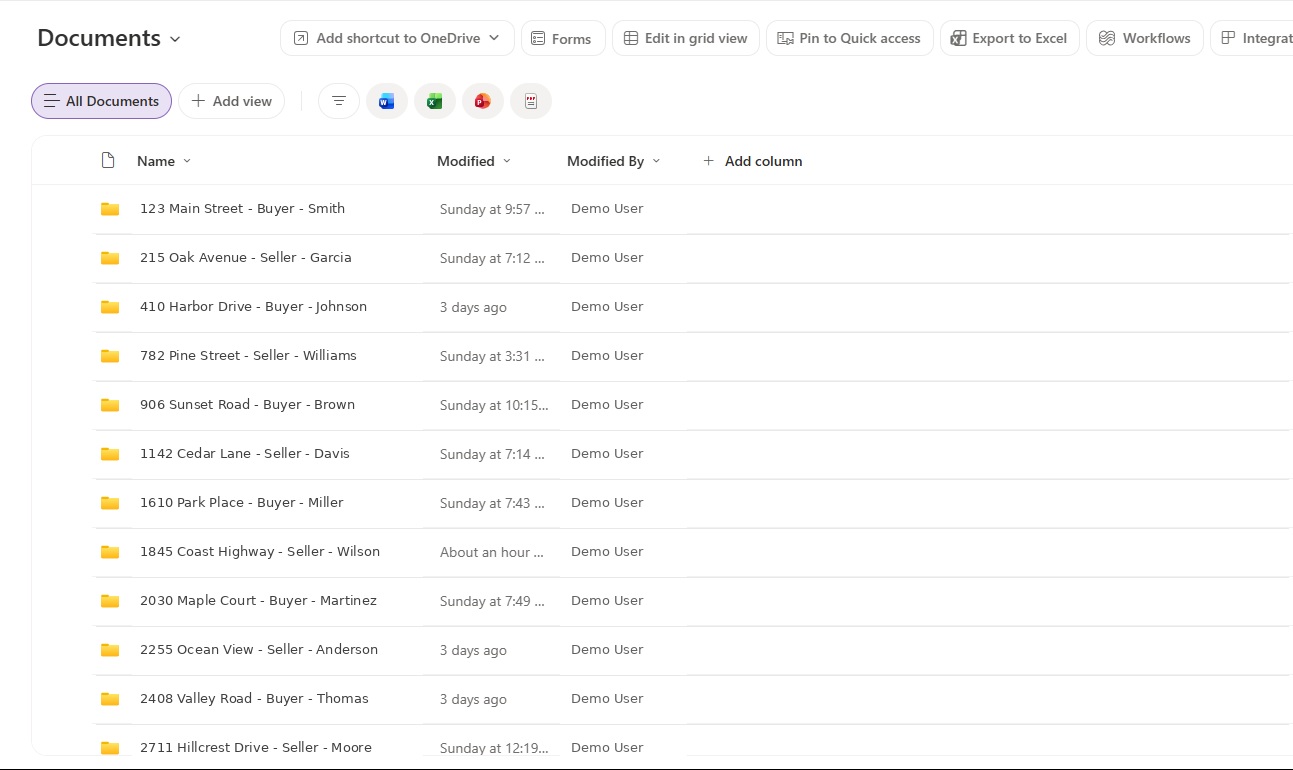
Each folder name combines the property address, Buyer or Seller side, and client name. The example above uses fictional data.
Active transactions stay easy to reach at the library root, while every property follows the same internal filing system.
Active files remain at the top level.
Documents are separated by purpose, with a dedicated location for client uploads.
The transaction folder and standard structure are ready when a new file is opened.
Realtors and coordinators work from the same organized file instead of scattered email attachments.
The complete transaction record stays together for future reference and retention.
Simple by design
No new password to remember. Your invitation connects you directly to the transaction your team prepared for you.
Your transaction team sends a private portal invitation to your email address.
Microsoft may send a one-time code to confirm that the invitation belongs to you.
Review milestones, open shared documents, and upload requested files from one organized portal.
Security comes standard
TCPath uses Microsoft 365 and transaction-specific permissions to help keep your information with the people involved in your closing.
Bring clarity to every closing
Tell us about your transaction process and the experience you want to give your clients.